~/lab/filament-prismatica $ ./open
Filament-Prismatica · Tratto · Strati
v2.2.0 · Prismatica 1.13 · Tratto 0.9 · Strati 0.1 · liveA filament inventory for 3D printing, plus a tool that turns any picture into 3D triangle wall art, printed one colour per plate with the filaments you actually own, one that turns the printer into a pen plotter and cutter, and one for colour relief lettering.
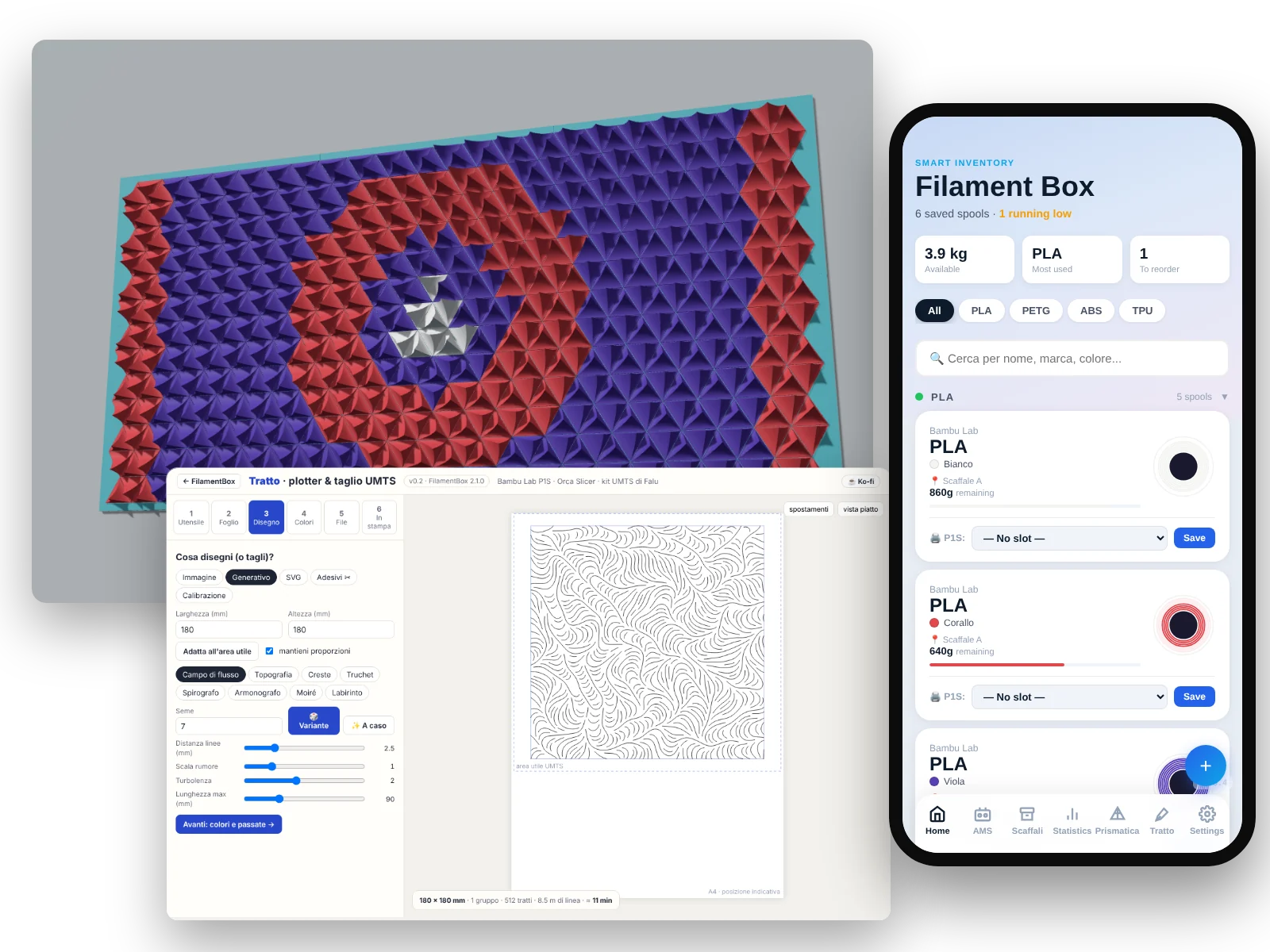
four tools, one inventory
FilamentBox
Keeps track of every spool: how much is left, where it is, whether it is still sealed.
- Add spools by hand, from a barcode, from a photo of the label (Claude AI) or in bulk from a Bambu Lab invoice (PDF)
- Shelves view, AMS slots, print log and statistics
- With Home Assistant: used grams come off the right spool automatically after every print
- OpenTag3D NFC tags, written with your phone or a D1 Mini + PN532 reader
Prismatica
Turns a picture into a wall art made of hundreds of 3D-printed triangles that snap into a frame.
- Six piece shapes, heights and tip directions driven by the image
- Picks the colours among the filaments in stock, updated live
- 3MF and STL plates already numbered, one colour per plate: no AMS needed
- 1:1 assembly template for an A4 printer and optional Bambu color mixing
Tratto
Turns a Bambu Lab X1C, P1S or P1P (A1 and A1 mini unverified) into a pen plotter or a vinyl cutter with Falu's UMTS kit, and builds the file ready for Orca Slicer.
- From a picture (hatching, contours, line art, waves, spiral, single line), from an SVG or from random generative art
- Stickers: the pen draws the subject and the blade cuts around it, in the same place
- Technical drawings from a photo or from an STL/3MF: orthographic and isometric views, dimensions, border and title block
- 18 generative styles (flow field, Schotter, op‑art, cellular automata, tree, sunflower…) and 8 image styles, including stippling and sketch
- City maps from OpenStreetMap: streets, water, railways and contour lines, each with its own pen, with title and coordinates
- Effects: hand‑drawn wobble and offset copy with a second pen
- Multi‑colour drawings with several pens: images split into their colours, generative art split between pens
- Interface in English and Italian
- 3MF with the UMTS profile already set and pauses to mount, swap and remove the tool
- Step-by-step guide: mounting the tool, placing the sheet, calibration and first tests
Strati
Turns a word into colour relief lettering: an illustration inside every letter, each colour at its own height, so the printer changes filament only a few times.
- One illustration per letter, or one picture cut out by the whole text
- Joined letters (one sign as big as the bed) or separate letters (one per bed, much bigger)
- 2–6 colours from the pictures or from your FilamentBox spools, in the height order you choose
- Top rim around every letter, clean-up of specks too small for the nozzle
- 3MF for Bambu Studio and Orca with filaments and per-layer colour changes already set: AMS or manual pauses
- Five display typefaces, interface in English and Italian
Three editions
Same app, same screens. Pick the one that fits what you have at home.
| Lite | Smart | Full | |
|---|---|---|---|
| Needs a server | no | Docker | Docker |
| Where your data lives | your browser | your server | your server |
| Inventory, shelves, invoices, barcode | yes | yes | yes |
| Label scan with Claude AI | yes | yes | yes |
| Automatic usage from Home Assistant | no | yes | yes |
| NFC reader (D1 Mini + PN532) | no | yes | yes |
| Prismatica | yes | no | yes, live with your stock |
| Tratto: pen plotter and cutter with the UMTS kit (X1C, P1S, P1P, A1) | yes | no | yes |
| Strati: colour relief lettering | yes | no | yes, with your spools |
Get started
Lite: no install
- In the browser: press “Open FilamentBox” above. In Chrome or Edge you can install it as an app and use it offline.
- On a PC without internet: download the zip, unpack it and open
lite/index.html. - Your spools stay in that browser: export a backup from Settings now and then.
Smart and Full: home server
- Copy the
server/folder to a machine with Docker (NAS, mini PC, Raspberry Pi). - Start the stack in
docker-compose.full.ymlordocker-compose.smart.yml. - Connect Home Assistant in Settings and paste the generated webhook YAML.
Label scanning needs an Anthropic API key, which you add in Settings → Claude AI. Step-by-step guides, in Italian, are in the docs folder.
FilamentBox and Prismatica are free and open source. If they are useful to you, you can buy me a coffee: it helps pay for the time and the filament spent on test prints.
☕ Support on Ko-fiI'm not a programmer. I designed FilamentBox and Prismatica for my own printer and shelves and built them with AI (Claude): I decide what they should do and test them at home, the AI writes the code. Issues and pull requests are welcome on GitHub.